 Hontun

Every screen, one theme
The ClickGUI, title screen, server list, accounts, proxies, containers, buttons and sliders all follow the same look and the same accent color.
ui-mode · palette-colorHontun restyles Meteor's ClickGUI and Minecraft's own menus with one recolorable theme. Know a server inside out without giving yourself away, and never let it crash your game. Free and open source.
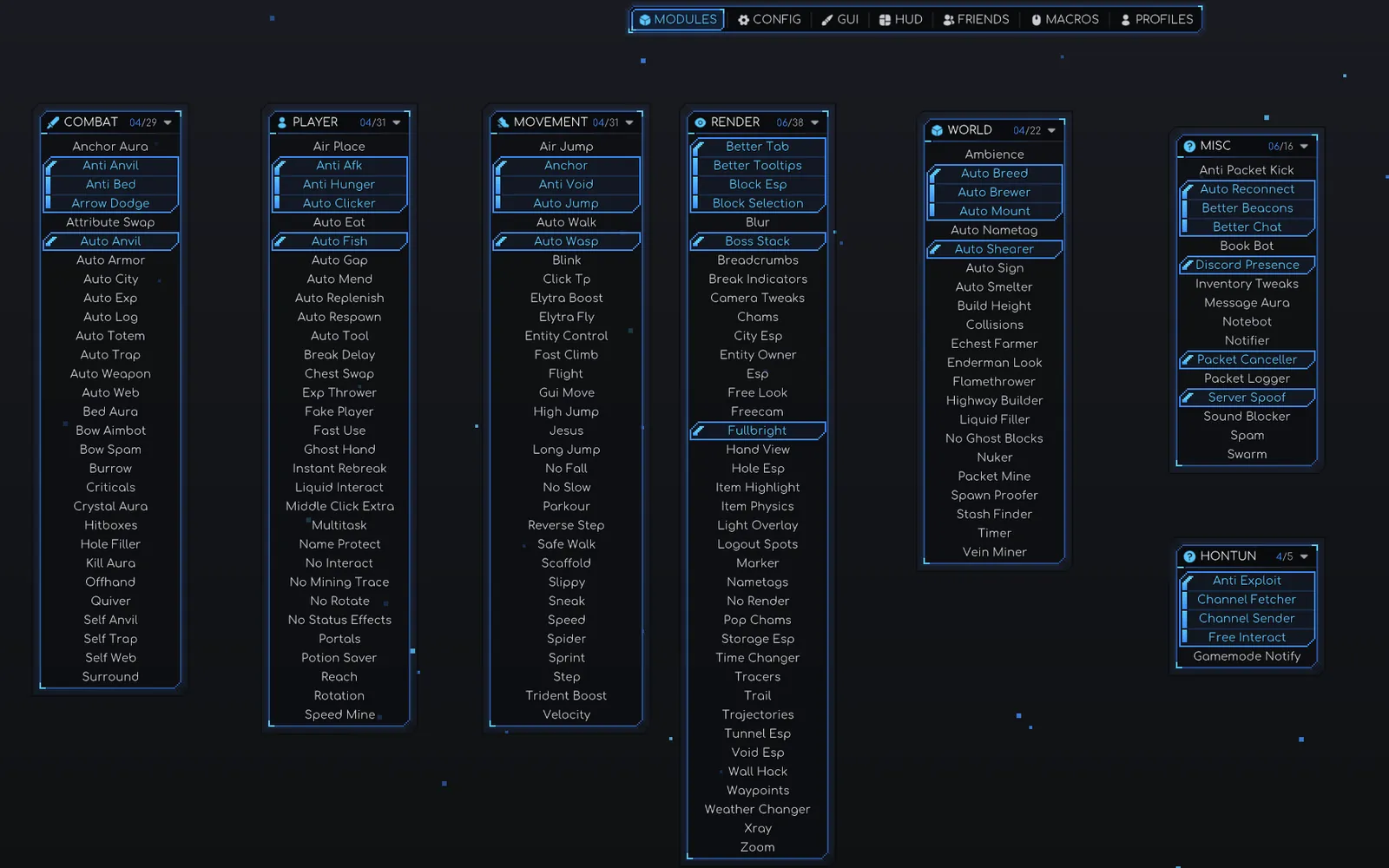
Hontun gives Meteor Client and Minecraft's menus one consistent look, then adds what Meteor does not ship with: crash protection, deeper server recon and a few handy commands.
The ClickGUI, title screen, server list, accounts, proxies, containers, buttons and sliders all follow the same look and the same accent color.
ui-mode · palette-colorAnti Exploit cancels incoming packets that would crash or freeze your client: impossible positions, oversized NBT, chat bombs and packet floods.
module · Anti Exploit.server reads the brand, software, real backend version, plugins, channels and hidden players. Software detection is passive and sends nothing.
Pick a ui-mode in the GUI tab and the whole client changes with it. Set palette-color and every accent, gradient and highlight follows it live, with no restart. Try it below on the game screens, recreated in the browser.

ClickGUI › GUI › ui-mode

Tick light-mode and only the ClickGUI goes light. Menus, chat, containers and the HUD stay dark, and text contrast stays readable on its own.
click-gui follows ui-mode by default, but you can pair any two, for example HModern2 menus with the SmogClient ClickGUI. Window positions are shared, so nothing moves.
Scale, corner radius, window and background opacity, animation easing, snapping grid, category and tab icons, and a tree view for dependent settings.
The server list, title screen and connect screen get new layouts, and so do the account, proxy and version screens.

In HModern2 and SmogClient each server gets a card with its icon, one MOTD line, and a column for the country flag, player count and ping. Drag a server to reorder the list.
The Hontun badge replaces the Minecraft wordmark, tinted by your palette with a soft glow, and the splash text is hidden. SmogClient shows its own logo; Vanilla keeps the original.

Every join phase with its own timer, visible from the first frame. A stalled join shows exactly where it stalled.

A 3D model of the active account, search, and offline, Microsoft, The Altening or session-token login in one themed window.

Pick a protocol version from the multiplayer screen, with per-version icons and per-server overrides in Edit and Direct Connection.

The full add form, live status and latency, in the same theme as everything else.
Grab a server or a resource pack and drop it where you want it.
Looked up in the background after a server finishes pinging. Off with server-country-flags.
Inside the ClickGUI, find any module or setting by name.
Inventories, chests, buttons, text fields, sliders, scrollbars and the hotbar follow the theme.
Meteor's HUD element, themed, showing seconds and milliseconds since the server last answered.
An animated gradient with accent particles replaces the panorama behind the menus. SmogClient has its own.
Five modules in their own Hontun category, plus commands that use Meteor's prefix. Settings on the module cards are the defaults.
Cancels incoming packets that would crash or freeze your client, with an optional per-type debug log of exactly what was blocked.
Sends a custom payload on any channel, even unregistered ones. The data can be plain text, hex bytes or a 4-byte number. Press Send once, or tick Auto send to repeat it.
plugincloudsyncUtf8 · Hex · Int321 to 2000020 ticksRecords the plugin channels a server uses, from register messages and payloads. List them later with .server channels.
0 ticksvoice chat spamRemoves a couple of client-side interaction limits: attack while using an item, and attack and use items in a boat while it moves.
Tells you when someone changes their gamemode, with a chat message, a toast, or both.
. by default.Lists commands that plugin hiders try to hide.
args <command>raw <buffer>listenumSnaps you to the middle of your block, snaps your view to the nearest of 8 directions, or both.
positionlookbothRuns a command for every player or N times, with optional delays. %player% becomes each name.
players3s..5s100tRejoins the current server, optionally under another offline name. Alias .rejoin.
<name>Keeps the player list open so you do not have to hold the key.
Resolved IP, brand, software, real backend version, protocol, data packs, permission level, render and simulation distance, the pushed resource pack and more.
Hontun adds three subcommands to Meteor's server command and upgrades plugins and info.
channelsPlugin channels captured so far.pluginsScans the server's plugins and falls back to bypass when nothing shows up.playersFinds the real online roster and flags players hidden from the tab list.softwareGuesses the server software and any proxy in front, without sending anything. Behind server-side ViaVersion it reads the real backend version.A browser recreation of Hontun's ClickGUI and windows. Change the look the same way you would in game. Nothing to install, and nothing it does touches your game.

Runs right here. Best with a mouse and keyboard.
ui-mode and click-gui in the GUI tab, like in Meteor.palette-color and watch every accent follow.Hontun is client-side only. Nothing needs to be installed on the servers you join.
Without ViaFabricPlus the version picker is hidden and everything else works the same.
Use the Fabric installer and pick Minecraft 26.2.
Put Fabric API, Meteor Client (26.2) and the Hontun jar from Releases into .minecraft/mods.
Add ViaFabricPlus if you want the themed protocol-version picker on the multiplayer screen.
Hontun switches to its own GUI theme if Meteor's default theme was active. Press Right Shift, open the GUI tab and pick your look.
$ git clone https://github.com/HonzasikCZ/Meteor-Addon-Hontun.git
$ cd Meteor-Addon-Hontun
$ ./gradlew build
# the jar lands in build/libs/
> git clone https://github.com/HonzasikCZ/Meteor-Addon-Hontun.git
> cd Meteor-Addon-Hontun
> gradlew build
# the jar lands in build\libs\
Yes. Hontun is free and open source under GPL-3.0. Download it from GitHub Releases.
Hontun always follows the newest Minecraft version that Meteor Client runs on. Right now that is Minecraft 26.2 on Fabric, with Meteor's 26.2 build, Fabric API and Java 25 or newer.
No. It only enables the protocol-version picker. Without it the picker is hidden and everything else works the same.
Open the ClickGUI (Right Shift by default) and go to the GUI tab. ui-mode changes the whole client, click-gui changes only the ClickGUI, palette-color sets the accent and light-mode makes the ClickGUI light.
Only the country-flag lookup, which is on by default and sends server addresses to ipwho.is. Turn it off with server-country-flags.
Hontun uses and adapts code from these projects. Thank you to their authors.
The client Hontun extends.
ViaFabricPlusViaVersionProtocol versions and their icons.
Catppuccin AddonPindourClickGUI.
DupersUnitedYAYLOLDEVReal backend version detection.
Meteor RejectsCloudburstGamemode Notify.
AntiP2W-Addon0x06Free Interact and Anti Exploit.
ParadiseClient-XSpigotRCE.toggletab
Draggable ListsMrMelon54Drag to reorder servers and packs.

Latest release 1.0.6 · Minecraft 26.2 · Fabric · GPL-3.0